%20(1).png)

.png)
Why The Staff Channels Approach Outperforms Traditional Communication
Email sequences, PDFs, social posts, and onboarding webinars all have value, but none of them react to student emotions or send push notifications to them in real time.
Staff Channels + Goin’ Score do.
- Students express concerns →
- Sentiment analysis detects them →
- Universities respond with targeted reassurance →
- Melt risk drops before it ever becomes visible, Yield improves
How? Follow the article to see how you can achieve meeting students with the right message, in the right format, at exactly the right time.
What Are Staff Channels?
Staff Channels—also known as “Official Groups”—are a dedicated communication layer within the Goin Community. Activated through the Uni Admin dashboard in the Group Explorer, these channels are marked with an "Official" badge and can be filtered easily in the mobile app. Their core function is to serve as a centralized hub for announcements and updates directed to specific groups of students, such as international applicants, admitted students from a particular region, or program-specific cohorts.
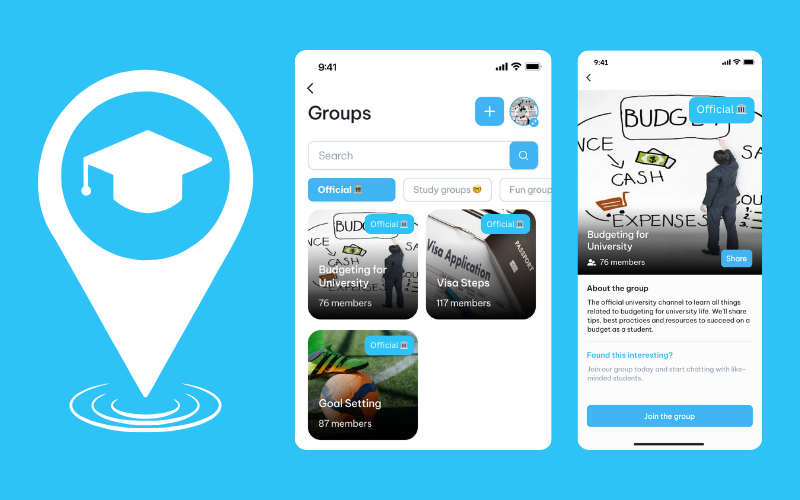
SCs are purpose-built for:
- One-way, high-clarity updates — only administrators can post
- Optional replies when two-way discussions are needed
- Noise-free communication, separate from peer chat
- Proactive Action from Real-Time Segmentation results of the sentiment analysis (The Goin’ Score)
- Cohort targeting: students on the fence of deciding, regional groups, specific programmes, or all international offerholders
This is especially valuable during the pre-arrival period, when students are navigating a flood of information—often from WhatsApp rumours, scattered emails, or confusing forums. In this critical phase, SCs act as a single source of truth that students can trust.
Plus, because these official messages are delivered directly within the student’s existing community space and supported by push notifications, they land exactly where students are already talking, worrying, and making decisions. This ensures vital updates don’t get lost in the noise but reach students when and where they’re needed most.
What Type Of Messages Can You Share In Staff Channels?
Today’s offerholders crave relevance, clarity, and authentic communication. Goin’s Staff Channels are designed for exactly that. They support a wide range of formats, so universities can tailor each message to its purpose, urgency, and emotional tone.
You can share:
- Text-based updates for clear, quick communication
- Images and videos to visually guide, showcase, or inspire
- Polls to gather instant feedback or preferences
- GIFs and emojis to match the informal tone students use
- Deeplinks to lead students directly to forms, events, or support
- Push notifications to cut through distractions and drive action
- Surveys to collect insights and feed the Goin Score for sentiment tracking
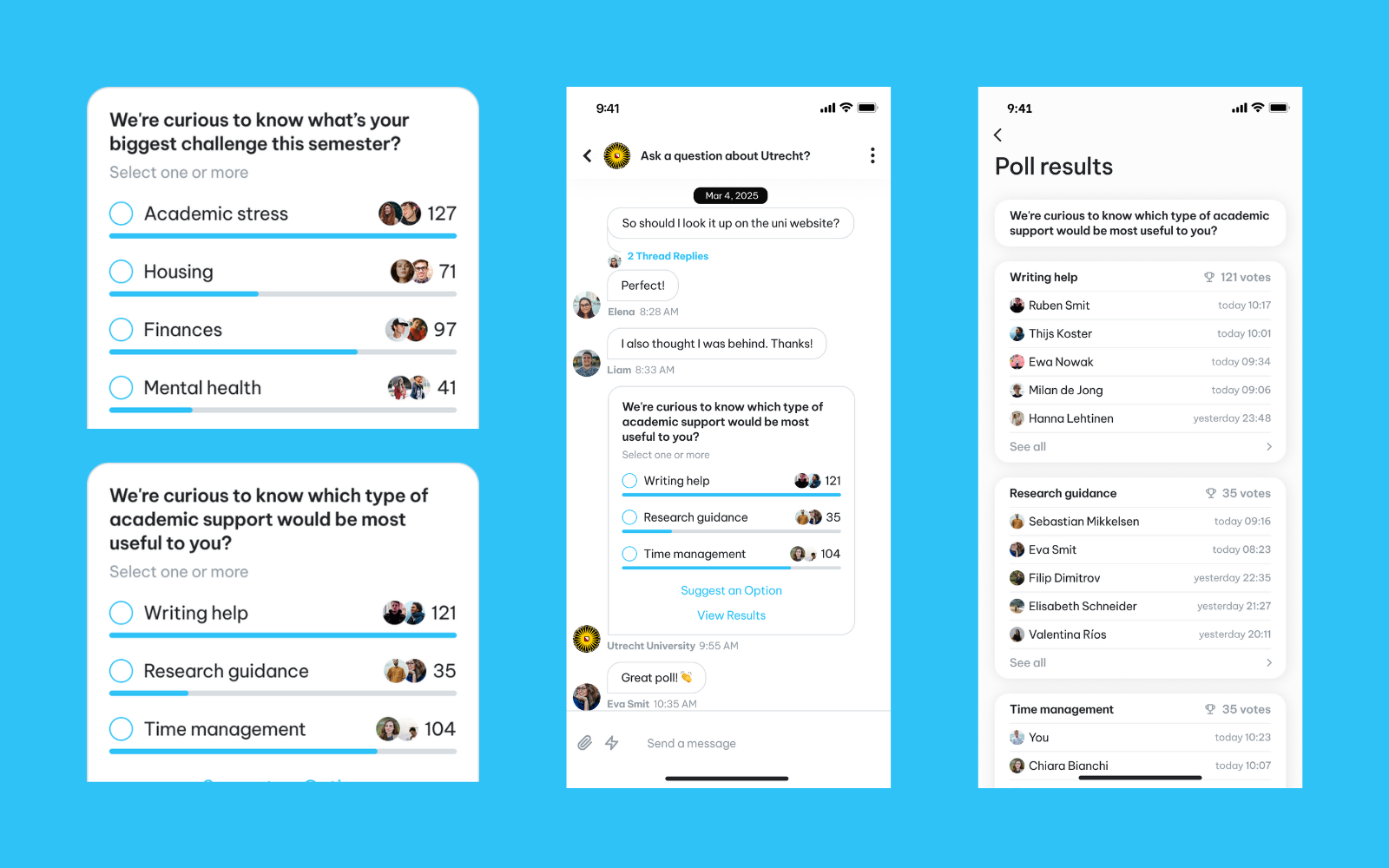
This multi-format flexibility, paired with real-time student sentiment, turns Staff Channels into a strategic center for proactive, high-impact engagement.
How to Enrich Staff Channels with The Goin´ Score
The real game-changer emerges when Staff Channels are used alongside The Goin’ Score, a dynamic metric derived from real-time sentiment analysis. The Goin Score reflects students’ emotional engagement and likely commitment based on their activity, sentiment trends, and behavioural signals. They are then sent to an embedded survey on the app where this can give universities the perfect opportunity to gauge how students truly are feeling.
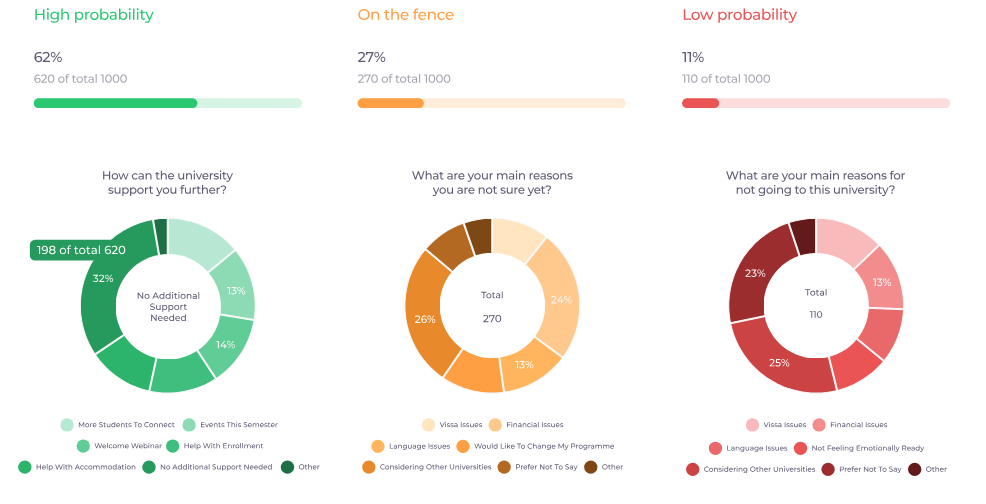
As highlighted in Goin’s sentiment analysis guide, this solution helps universities predict and improve yield by identifying drop-off risks early. If a cohort shows declining sentiment or repeated concerns about a specific issue—like accommodation, visa uncertainty, or language barriers—this insight becomes actionable in real time. SCs become the direct channel for communicating those insights into action.
For example:
- Financial stress: Lead them to your webinar on ‘How to Budget for University’, or articles on part-time work regulations, budgeting resources, or even directly connect students with others working locally.
- Visa anxiety: Push notify them on timeline-based webinars, involve your visa support team, or communicate to pair students by region for peer advice.
- Language concerns: Share free or discounted language course, offer buddy pairings, or highlight non-academic language events in those dedicated channels.
Further Breakdown of How Staff Channels Provide Effortless, Data-Driven Objection Handling
Let’s say the sentiment data reveals a recurring concern around “Language Issues” in a specific group. Normally, this anxiety grows quietly in private chats. By the time it impacts decision-making, it’s already too late.
With Staff Channels, university staff or ambassadors can instantly address this concern at scale by posting targeted reassurance, FAQs, or even promoting peer stories that highlight language support services.
That message can include:
- a simple explanation of language requirements
- Image/video-based content on the flow to mastering a language
- links to pre-arrival language support
- details about writing centres and tutoring
- testimonials from non-native speakers who thrived
This approach results in:
- Scalable intervention: Address hundreds of students with one strategic message.
- Proactive reassurance: Remove uncertainty before it grows into dissatisfaction.
- Trust-building at scale: Transparent and empathetic messaging strengthens commitment.
The Bottom Line: Smart Communication That Directly Impacts Yield/Conversion
By integrating the precision of Goin’s Score with the broadcast power of Staff Channels, universities unlock new solutions of predictive, responsive, and scalable communication. Staff or ambassadors can cut through the noise, reassure hesitant offerholders, and move the needle on conversions—all with a few well-placed, data-informed messages.
%20(1).png)
.png)
.svg)
.png)
.png)
%20(1).png)
.jpg)
.png)
.png)
.png)
%20(1).png)
.png)
.jpeg)
.png)
.jpg)
.png)
.png)
.png)

%20(1).png)
.png)
.png)
.jpg)
.png)
.png)
.png)
.jpg)
.png)
.png)
.svg%20(1).png)
.png)
.png)
%20(1).png)
.png)
.png)
%20(1).png)
.jpg)
%20(1).png)
%20(1).jpg)
%20(1).jpg)

.svg)
.png)
%20(1).png)
.png)
.jpg)
.svg)
.jpg)
.jpg)
.png)
%20(1).png)
.png)
.svg)
.jpg)
.png)

.png)

%20(1).png)
.png)
.png)
.png)
.png)
.png)


%20(2)%20(1).png)


.jpg)


.png)
.png)
.png)
.png)
.png)
.png)
